
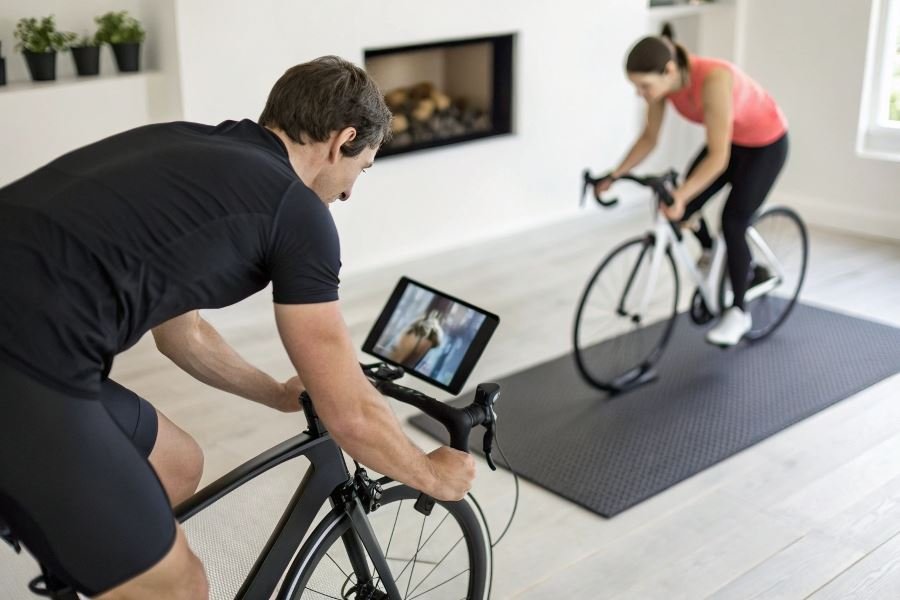
Ever watched pro cyclists tackle the legendary climbs of the Tour de France from your living room and thought, “I want to feel that burn”? Indoor cycling has undergone a revolution that’s turning solitary sweat sessions into immersive adventures through digital landscapes and global competitions.
Virtual training apps paired with bike trainers have fundamentally changed how cyclists train indoors. No longer are you staring at a wall counting down minutes—you’re racing against riders from Tokyo to Toronto, climbing the Alps, or cruising through virtual renditions of Hawaiian coastlines.
What exactly are bike trainers and virtual platforms?
Bike trainers are devices that transform your regular bicycle into a stationary exercise machine. When connected to virtual training platforms like Zwift, TrainerRoad, or RGT Cycling, they create a responsive experience where resistance changes based on virtual terrain.
“The integration of smart trainers with virtual worlds has single-handedly saved my winter training motivation.” — Professional cyclist testimonial
The game-changing benefits
Connecting your trainer to virtual apps delivers three major advantages:
- Data-driven training: Track power output, cadence, and heart rate with laboratory-grade precision
- Weather-proof consistency: Snow, darkness, or thunderstorms become irrelevant to your training schedule
- Community motivation: Join scheduled group rides or races with cyclists worldwide
Choosing compatible equipment
Not all trainers play nicely with virtual platforms. Here’s what works:
- Smart trainers (direct-drive or wheel-on) offer the most seamless experience with automatic resistance control
- Traditional trainers can connect through additional speed/cadence sensors
- Roller systems require power meters for full functionality
The technology that measures your effort—whether built into the trainer or added separately—is what transforms an ordinary indoor ride into a virtual cycling experience worth sweating for.
Connect Your Bike Trainer to Virtual Worlds in 4 Simple Steps
Ready to transform your indoor cycling sessions from mundane to magnificent? The technology that powers virtual training has exploded in recent years, creating immersive experiences that rival outdoor rides. Let’s dive into the nuts and bolts of how to connect a bike trainer to virtual training apps so you can join thousands of cyclists exploring virtual mountains from their living rooms.
Setting up your hardware: the foundation of virtual riding
First things first—you need your bike trainer properly positioned and assembled. For smart trainers like the Wahoo KICKR or Tacx Neo, ensure you’re on a level surface with adequate space around you. Most trainers require:
- A stable floor (carpet mats help reduce vibration)
- Access to power outlet
- Proper cassette installation matching your bike’s gearing
- Correct skewer or thru-axle adapters
Pro tip: Place a fan directly in front of your setup—you’ll generate serious heat during intense virtual climbs!
For wheel-on trainers, check tire pressure (usually 100-110 psi) and perform a proper tension adjustment against the resistance unit. This seemingly small detail dramatically affects power accuracy.
Software setup: your portal to virtual worlds
The app ecosystem for virtual cycling has matured beautifully. Start by downloading your platform of choice—Zwift, TrainerRoad, or RGT Cycling—to your preferred device.
During installation, you’ll need to:
- Create a user profile with accurate height/weight metrics
- Set power zones (if known)
- Configure display settings for optimal viewing
- Select measurement units (miles/kilometers)
Most platforms offer free trial periods, so experiment before committing. Each provides unique experiences—Zwift excels at social riding while TrainerRoad focuses on structured training.
Pairing via Bluetooth/ANT+: the critical connection
This is where the magic happens! Your trainer needs to talk to your app through either Bluetooth or ANT+ protocols.
| Connection Type | Pros | Cons |
|---|---|---|
| Bluetooth | Works with most devices natively | Limited to one connection at a time |
| ANT+ | Connects to multiple devices simultaneously | Requires USB dongle for many computers |
To pair your devices:
- Activate your trainer
- Open the app’s device pairing screen
- Select your trainer from available devices
- Confirm connection (watch for power/cadence readings)
Troubleshooting tip: If pairing fails, try moving your ANT+ dongle closer to the trainer using a USB extension cable or restart your Bluetooth connection.
Calibration: unlocking accurate performance metrics
Don’t skip this crucial step! Proper calibration ensures your virtual watts match real-world effort. Most smart trainers require:
- A 10-minute warmup to stabilize operating temperature
- Accessing calibration function in the app or manufacturer’s utility
- Following prompts (typically a spindown test)
- Confirming successful calibration
Calibrate every 2-4 weeks or after significant temperature changes for optimal accuracy. Your virtual racing competitors will appreciate your honesty!
For the most immersive experience, consider adding cadence sensors, heart rate monitors, and even steering platforms like the Elite Sterzo to enhance realism. The depth of your virtual cycling experience is limited only by your imagination (and perhaps your budget).
With everything properly connected, you’re ready to tackle epic climbs, join group rides, or crush structured workouts—all without leaving home. The virtual roads await!
Troubleshooting Your Virtual Cycling Connection
When your trainer refuses to cooperate
Nothing derails a planned Zwift session faster than connection issues. You’re kitted up, water bottle filled, towel at the ready—and your Wahoo KICKR refuses to pair with your app. Frustrating? Absolutely. Common? Unfortunately, yes. The good news is that most connection problems have straightforward solutions.
The most frequent culprit is Bluetooth interference. In our increasingly connected homes, dozens of devices compete for bandwidth. Try moving potential interference sources (wireless speakers, smartphones) away from your training setup. For ANT+ users, position your USB dongle closer to your trainer using an extension cable—this simple $15 fix resolves about 70% of dropout issues.
Firmware updates are another critical checkpoint. Manufacturers like Tacx and Saris regularly release updates that improve connectivity. Many users struggle for weeks before discovering their trainer simply needed the latest software version.
Power calibration issues often masquerade as connection problems. If your power readings seem wildly inaccurate (that 600-watt sprint felt more like 300), perform a spindown calibration through your trainer’s companion app before blaming the connection.
Banishing lag and data hiccups
Nothing breaks immersion faster than jerky video or delayed power readings. The difference between smooth and laggy virtual riding often comes down to optimizing your data transmission.
Wired connections trump wireless when stability matters. Whenever possible, connect your computer or tablet directly to your router via Ethernet cable. This single change can dramatically reduce the data bottlenecks that cause stuttering in graphics-intensive apps like Rouvy or FulGaz.
For tablet users, a dedicated training device makes a world of difference. That aging iPad running twelve background processes will struggle compared to a device dedicated solely to your training apps. Clear unnecessary apps and restart your device before training sessions.
Bandwidth management matters too. If possible, schedule your training when household internet usage is lower. Ask family members to avoid streaming 4K videos during your virtual Alpine climbs—your avatar will thank you.
Gear that elevates the experience
The right accessories transform virtual training from a workout into an experience. Here’s what makes the biggest difference:
| Accessory | Benefit | Approximate Cost |
|---|---|---|
| Heart Rate Monitor | Accurate training zones, unlocks heart-rate based workouts | 50−100 |
| Powerful Fan | Prevents overheating, simulates outdoor airflow | 30−150 |
| Training-Specific Mat | Absorbs vibration, protects floors from sweat damage | 60−120 |
| Sweat Cover | Prevents corrosion on headset and frame | 15−30 |
A quality heart rate monitor from Polar or Garmin provides the data needed for truly effective training. The chest strap varieties remain the gold standard for accuracy during high-intensity intervals.
Don’t underestimate the importance of cooling. A high-velocity fan isn’t just comfort—it’s performance equipment. Studies show proper cooling can extend high-intensity efforts by up to 15%. The Wahoo KICKR Headwind even adjusts speed based on your heart rate or power output.
For immersion seekers, the Sterzo Smart Steering Block allows realistic steering in compatible apps, adding a dimension of handling that transforms the experience from stationary cycling to virtual riding.
With these troubleshooting tips, optimization strategies, and key accessories, your virtual training setup will deliver the reliable, immersive experience that keeps you coming back for more miles—regardless of what Mother Nature has planned outside.